Windows 11 Home, AV - Windows Defender (turned off). Reboot happens as soon as I select the bin file...
Thanks, that screenshot explains a lot — two things stand out and both are fixable on your side.
1. The package isn't fully extracted — you're running the wrong executable
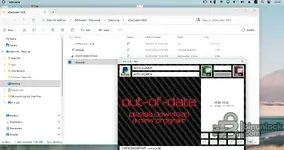
Your folder only contains four items: the BIN (
2014 buick encore), the
Activate internet shortcut,
D19F9DD801DF74FF registration entries, and
xDecoder (7.44 MB). A complete 14.0 package is not a single EXE — there is no
START-xDecoder.exe in that folder, so you're launching
xDecoder.exe directly. That is exactly what produces the "out-of-date / please download a new program" screen: the version/license check is handled by the starter, not by the main EXE. Extract the whole archive again (open the archive, Extract All — don't drag one file out of it) and launch only
START-xDecoder.exe as administrator.
2. The folder is inside OneDrive and is still syncing
The breadcrumb reads Start OneDrive → Mehmet - Personal → Desktop → xDecoder-14.0, every file shows a sync icon, and the status bar says "Sync pending". With Files On-Demand, the BIN can still be a cloud placeholder, so when the program tries to read it the file is pulled down mid-read or the handle fails — that is a very plausible cause of the hard crash/reboot the moment you select the BIN. Move the whole thing off OneDrive: create
C:\xDecoder-14.0, extract there, and copy your BIN files into a local folder as well (
C:\Tuning\). A short path with no spaces, as before.
On Defender — disabling it entirely is worse than excluding the folder, because the tamper/real-time service can still re-enable itself and act on the files. Turn it back on and add
C:\xDecoder-14.0 (and your BIN folder) to exclusions instead. Also check Protection history / quarantine — if files were removed from your original extraction, that would also explain the incomplete folder.
Good news on licensing: the title bar already shows
D19F9DD801DF74FF - mehmet68, so your HWID registration is applied. The out-of-date banner here is a launcher problem, not a license problem.
If it still reboots after a clean local extraction with the starter: tell me whether the reboot is instant or a BSOD with a stop code, and check Event Viewer → Windows Logs → System for Event ID 41 / BugCheck right after it happens. Post that stop code plus the file size of the Buick Encore BIN you're opening.


 Tuning Tools & Software category, and the download/purchase goes through that resource page under your own forum account. I don't have pricing or access control on my side, and I can't set it from this thread.